License Statistics version 7.2 introduces updated layouts and UI for feature and user reports, improvements to agent auto-update and User Directory authentication features, support for new platforms and license manager features, as well as many other enhancements and fixes.
Read on to find out what’s new in License Statistics v7.2.
New Features
The new features in this release are described below.
New layout for reports
All user and feature reports have been updated with new layouts and UI elements. Although the reporting functionality has not changed, you may notice some subtle differences in the look and feel of common actions, including:
- Sorting and filtering controls for grids
- Column visibility management
- Layout of the general information area at the top of report pages
Report updates also include many improvements, such as:
- Dynamic grid height
- Responsive view for forms and settings
To learn about the general use of reports, review the information in:
- Introduction to using License Statistics pages
- General use of feature reports
- General use of user reports
User Directory password caching
Authenticating License Statistics users using a User Directory directory, such as Active Directory or LDAP, eliminates the tedium of adding users manually in License Statistics by enabling users to log into License Statistics using their username and password that’s stored in the User Directory.
In previous versions of License Statistics, passwords authenticated with a User Directory were automatically cached, thereby allowing users to log in using their User Directory account credentials even if a connection can’t be made to the User Directory. The cached passwords are stored in the database and can be used for 30 days from the last successful user authorization.
In this release, we’ve made User Directory authentication more flexible by providing an option that lets you choose whether to cache the user passwords. With caching disabled, user passwords won’t be stored in the License Statistics database. This may be preferable depending on your company’s policies; however, if a connection cannot be made to the User Directory server, the user authorization will fail.
License Statistics administrators can enable/disable password caching at any time. By default, caching is now disabled unless you’re migrating License Statistics from a previous version with User Directory enabled, in order to maintain backward compatibility.
New platforms
This release adds support for new SUSE and openSUSE platforms, including:
- SUSE LES 15.7
- SUSE LES 16.0
- openSUSE 16.0
Additional license manager feature support
License Statistics v7.2 includes additional support for:
- Merging Reprise License Manager (RLM) sessions by ISV value
- Monitoring “Casual” licenses for Dassault Systèmes License Server (DSLS)
Enhancements
In addition to the new features described above, this release delivers numerous enhancements.
Added ability to retry failed agent updates
License Statistics Agent is a License Statistics add-on tool that communicates between applications and License Statistics. Agents support Autodesk license usage monitoring, Custom Application monitoring, License Server Management, (starting, stopping, and restarting the server), and License Harvesting (a License Statistics add-on that helps reduce license usage by tracking and closing idle applications on end-user hosts).
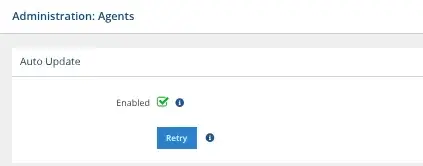
License Statistics lets you schedule automatic Agent updates, ensuring you always have the latest agent versions. As of this release, if the automatic update fails to run at its scheduled time (for example, due to a failed connection), there is now the ability to retry the update procedure by clicking Retry in the Administration: Agents page:
Other enhancements
Additional enhancements in this release include:
- Database performance improvements
- General performance and stability improvements
- Tooltip additions and improvements
For a complete list of enhancements and fixes, see the License Statistics v7.2 Release Notes.
As always, the improvements made in License Statistics v7.2 are in response to customer feedback, so please let us know what you think of the License Statistics v7.2 new features and enhancements, and don’t hesitate to contact support@x-formation.com with any questions. We look forward to hearing from you!
Get to know License Statistics